Live Lighting Controls Adding live responsive VJ controls to Naga
A hardware controller mapped onto a hundred feet of steel: two decks, a crossfade, and a serpent that moves on the beat.
We wanted to play a DJ set and run the serpent's visuals in the same set, live, with the same pair of hands. The sunset schedule that lights Naga every other night of the year is exactly wrong for a party: it does not know what track is on, it does not know where the drop is, and nobody wants to watch a sculpture breathe politely through a peak. So we built an operator console for it, and since the operator is also the DJ, we built it the way a DJ already thinks: two decks, a blend between them, and levels you can ride without looking down.
The hardware is a Novation Launch Control XL, a mixer-shaped MIDI controller that sits flat next to the decks: eight faders, three rows of knobs, two rows of buttons. The browser talks to it directly over Web MIDI, so plugging it in over USB is the whole setup, no driver and no app. Every control on the hardware has a twin on the page, mapped one to one, so the rig also runs from a trackpad in a pinch. Slower, and with none of the feel, but the show goes on.


The serpent as a channel strip
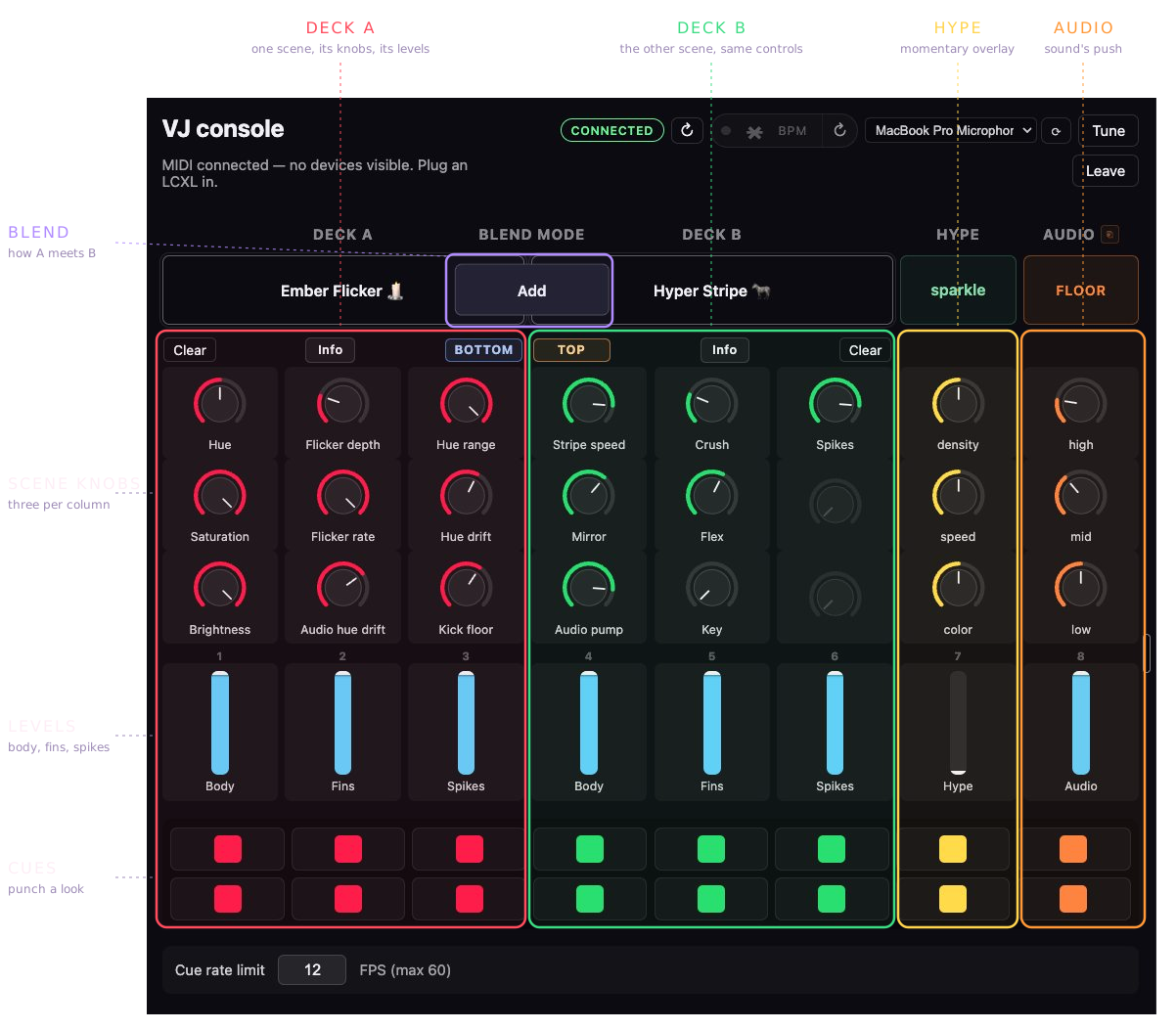
The mapping treats the sculpture's anatomy as mixer channels. Six of the eight faders are levels for the body, the fins and the spikes, three per deck, mirrored: deck A runs spikes, fins, body in from the left edge, deck B runs body, fins, spikes back out to the right. The mirroring is for muscle memory. Whichever deck you are working, the spikes are at the outside edge and the body is in the middle, and after an hour in the dark your hands know that without you.
The two faders on the right are not levels. One is hype, a momentary overlay of sparkle or strobe that rides on top of whatever both decks are doing, with its own knobs for density and speed; pull it to zero and it is gone. The other is audio, how hard the music is allowed to push the lights around, with trim knobs for the high, mid and low bands. The three knobs above each deck fader belong to whatever scene is loaded there. A scene publishes a small set of named controls, flicker depth, hue drift, stripe speed, and the console lays them out over its columns. Load a different scene and the same knob does a different job, which is exactly how a DJ's effects unit already behaves. The buttons underneath punch cues.
Blending, not switching
Scenes load onto deck A and deck B like records. Between them sits a blend mode rather than a crossfader: add is the default, which matches how diffused LEDs actually feel, two scenes lighting each other up rather than politely taking turns. When add blows out, the blend switches to lightest or multiply and one deck reads through the other instead of on top of it.
Because the levels are per body part, a crossfade does not have to be all or nothing. Bring the body over to deck B's stripes while the fins and spikes stay with deck A's ember flicker, hold it there for a verse, then walk the rest across one fader at a time. And the knobs push their values into the running patterns rather than restarting them, so a scene mid-flicker keeps its phase while you retune it. Nothing snaps unless you make it snap.
Finding the beat
For the serpent to move on the beat, something has to find the beat. A microphone at the booth listens to what the decks are playing, and the browser does the analysis right there: an FFT, per-band onset detection, and a tempo estimate that locks to the groove and predicts where the next downbeat lands. Beat detection turned out to be the deepest rabbit hole in the whole rig, worth an article of its own, but the short version is that one detector was not enough. Ours counts autocorrelation over spectral flux; on syncopated tracks it would confidently lock at half tempo, 60 when the room was hearing 120. So a second, independently built detector runs beside it with a completely different technique, and the two vote. When they agree, the lock is solid enough to trust for a whole set, and a tap-tempo button stands by for the nights the music wins anyway.
The whole system
The console is a web page, the serpent is in a pond, and the computer that renders its frames is a Raspberry Pi on a cellular link. Everything between them is two WebSockets doing two very different jobs.

Control changes, loading a scene, riding a fader, turning a knob, take the ordinary route: up to a small API in the cloud, which checks the session and forwards them down the cellular tunnel to the Pi. That hop costs about 185 milliseconds each way and it does not matter, because a fader move a fifth of a second late is still a fader move. The beat cannot ride that path. A pulse sent through the cloud arrives as a smeared echo of itself, late by a different amount every time.
So the audio gets two tricks. First, its own WebSocket, straight from the browser to the Pi. The API still does the introductions, handing the browser a short-lived token to present when it dials the Pi, and then steps out of the way entirely. Second, and this is the one that actually saves the show: the beat is predicted, not streamed. The browser does not send flash now, it sends the tempo and the time of the next downbeat, a few times a minute, and the Pi schedules every beat between anchors on its own clock. The network can hiccup all it likes; the serpent keeps time. Alongside that, the low, mid and high energy levels stream about twenty times a second for the parts that ride the sound rather than the grid, kick floors, audio pumps, the audio fader's whole column.
The frames themselves never cross the Internet. Everything the booth sends is a few hundred bytes of intent; the Pi renders 30 frames a second next to the sculpture and its Art-Net output stays on the local network, through the five hub boxes and out across 763 fixtures.
The latency budget
Before cutting any of this down we measured it, honestly. The probe is not a synthetic ping: it rides the same WebSocket, the same forwarding, the same engine queue as a real command, and every layer stamps its own clock as the packet passes, so a round trip can be split into legs without any two computers ever agreeing on what time it is. From a home connection, a command costs about 290 milliseconds end to end. Tethered to one bar of cellular, as close to standing in the park as we could simulate, about 320. And the attribution is lopsided: roughly 185 milliseconds of that is the single hop between the cloud and the Pi, a number that does not move whether the operator is on fiber or a phone, because neither end of that hop is the operator. The original target was 200 milliseconds total. On this path the floor is about 230 before a client even connects, so that target died in the measuring.
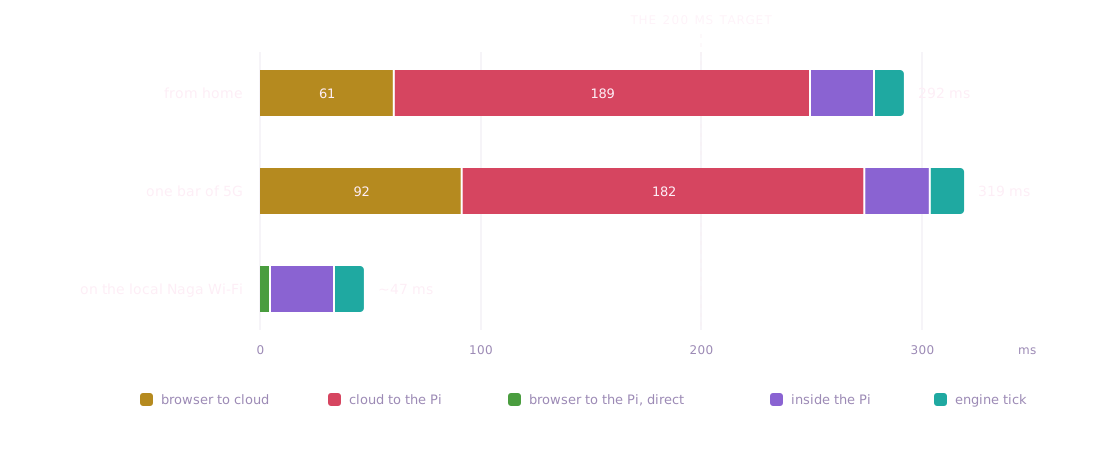
The mean was never the real enemy though. On weak cellular the typical command felt fine and the occasional one took two full seconds; it is the outliers people call laggy, not the average. Both cuts aim at exactly that. Moving the audio onto the direct socket removes the fat hop from the one path that cares, worth an estimated 50 to 80 milliseconds and, more importantly, most of the jitter. Predicting the beat removes the network from the equation entirely: once the Pi holds the tempo and the next downbeat, a slow packet delays a correction, never a beat. And because every audio command carries its timestamps anyway, the acks double as free telemetry: the console shows the live round trip during a set without sending a single extra packet.
What worked, and what fought us
Predicting the beat instead of streaming it worked. It is the single decision the rest of the rig leans on, and it is why the serpent stays in the pocket on a link that sometimes takes two seconds to deliver a packet. The mirrored fader layout worked; nobody has ever grabbed the wrong deck's spikes. Add as the default blend worked, because a serpent that gets brighter when you layer scenes feels like turning music up.
What fought us: our own knobs. A dragged knob emits a stream of values, eight knobs emit eight streams, and the first rehearsal flooded the pipe until taps queued up behind slider math. Now the console coalesces continuous controls to twelve updates a second, last write wins, and the difference is invisible on the LEDs. The audio pipeline fought us too, by living on a separate calibration page in a second browser tab. Every single "the lights are not reacting" moment in rehearsal traced back to that tab, closed, backgrounded, or never opened. The fix was to fold the pipeline into the console page itself, with one small BPM pill in the header: green when locked, and a dot that flashes only when a beat actually went out the wire, so one glance answers the only question that matters mid-set. Is the serpent hearing what I am hearing?
console a browser page mirroring it control for control
decks two, each holding a scene, with a blend mode between them
faders body, fins and spikes per deck, plus hype and audio
beat two independent detectors listening to one microphone, voting
transport two WebSockets: control through the cloud, audio straight to the Pi
render 30 frames a second on the Raspberry Pi in the park